
Discover the Messaging Portal
Stay connected with your teacher and classmates through one organised messaging space for announcements, homework reminders, class updates, feedback, and group communication.
Austrian Institute Egypt
July 7, 2026
 Digital Learning / Student Experience
Stay Connected with Your Course Group
Clear communication is an important part of every successful learning experience.
Important updates can easily get lost when class reminders, homework notes, teacher messages, and student questions are spread across different apps or long chat threads.
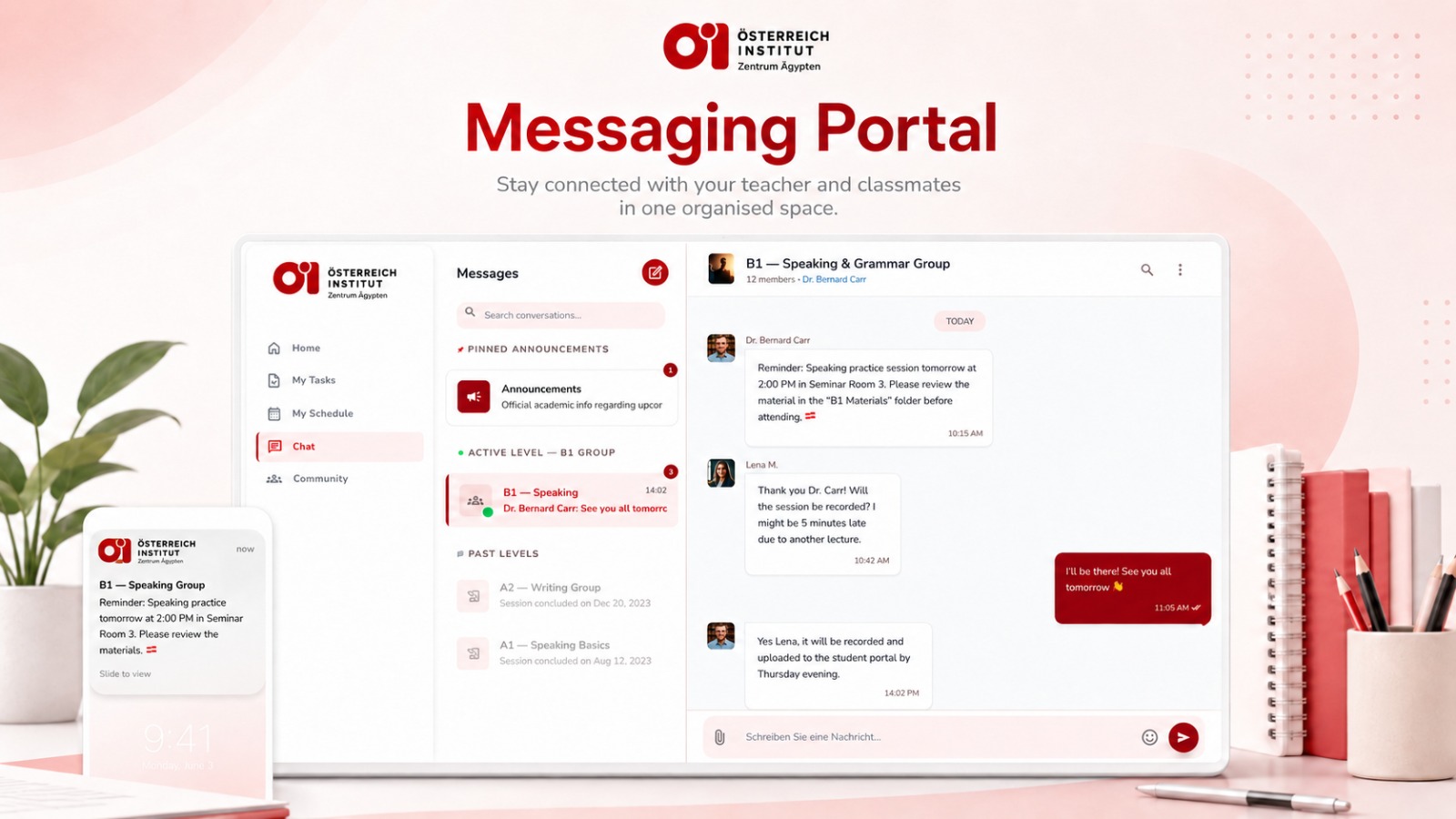
The Austrian Institute Messaging Portal brings course communication into one organised space inside the LMS Student Portal.
Students can follow teacher announcements, ask questions, receive reminders, and stay connected with their course group directly from their dashboard.
One Organised Space for Course Messages
The Messaging Portal is designed to make communication simple, clear, and easy to follow.
Instead of relying on scattered messages, students can access their course-group conversation from the LMS Student Portal and view the latest updates in one place.
Through the Messaging Portal, students can:
Receive course announcements from their teacher
Follow homework and session reminders
Ask questions related to the course
Communicate with classmates in the same group
View pinned announcements
Stay updated on important class information
Receive notifications for new messages and updates
Everything is connected to the student platform, allowing students to move easily between their messages, tasks, schedule, and course information.
How the Messaging Portal Works
Each enrolled student has access to their course-group conversation.
The group includes the teacher and students enrolled in the same course level or class group. This helps everyone stay aligned on class updates, reminders, deadlines, and important course communication.
At the top of the conversation, students can see the group name, course level, number of members, and teacher name, making it clear which course group they are communicating with.
Pinned Announcements
Important messages can be highlighted through pinned announcements.
This helps students quickly find official updates without scrolling through the full conversation history.
Pinned announcements may include:
Class reminders
Homework notes
Schedule updates
Exam-preparation instructions
Required materials
Important information from the teacher
Course Group Chat
The main chat area allows teachers and students to communicate in a simple and familiar way.
Teachers can send reminders, answer questions, and follow up with students. Students can reply, ask for clarification, and communicate with classmates when needed.
This keeps the course group connected while ensuring that communication remains inside the student platform.
Homework and Class Reminders
Teachers can use the Messaging Portal to remind students about homework, speaking practice, required materials, upcoming sessions, or preparation tasks.
For example, students may receive a reminder to review specific material before class or check a course folder before attending a session.
These reminders help students prepare on time and reduce the chance of missing important learning tasks.
Teacher Feedback and Follow-Up
The Messaging Portal supports direct follow-up between teachers and students.
Students can ask questions after class, confirm session details, or request clarification when something is unclear. Teachers can respond in the same conversation, keeping feedback connected to the course group and easy to review later.
Notifications That Keep You Updated
Students receive notifications when there are new messages, announcements, or important updates.
This helps students stay informed even when they are not actively browsing the platform.
Notifications may include:
Teacher reminders
Group updates
Homework notes
New replies
Session changes
Important announcements
Built for Classroom and Online Students
The Messaging Portal supports both classroom and online learning experiences.
Whether students attend sessions at one of the Austrian Institute branches or join online classes, they can use the same messaging experience to stay connected with their teacher and classmates.
There is no separate sign-up and no need to switch to another communication tool. Students simply log in to the LMS Student Portal and open their course messages.
Why It Matters
The Messaging Portal makes course communication more reliable, organised, and accessible.
Students know where to find teacher updates, class reminders, and group messages. Teachers can communicate with the full group in one place, while important announcements remain easy to access.
This creates a smoother learning experience and helps students stay focused, prepared, and connected throughout their course.
Ready to Experience It?
The Messaging Portal is part of the Austrian Institute student-platform experience.
Once enrolled in a course, students can access their course-group chat directly from the LMS Student Portal and stay connected from the first day of class.
Austrian Institute Egypt
Keep Reading
Related Journal Posts

Nature & Wildlife
A Living Legacy – Vienna's Historic Schönbrunn Zoo
Visit Schönbrunn Zoo, the world's oldest continuously operating zoo, set within the grounds of Schönbrunn Palace, where centuries of history meet modern conservation and beloved animals like giraffes
Read article
Nature & Wildlife
Where Wildlife Inspires – Egypt's Zoos
Explore the history and charm of Egypt's zoos, including the historic Giza Zoo, home to giraffes and a wide range of species, and discover their growing role in conservation and education.
Read article
History
In the Footsteps of the Pharaohs – Discover Saqqara
Explore Saqqara, home to the Step Pyramid of Djoser, the oldest surviving stone pyramid in the world, and one of Egypt's most significant archaeological sites near Cairo.
Read article